
A podcast website included with hosting
Does my podcast need a website?
A website helps when you want one shareable link with episodes, browser playback, and listening-app links. Listenbox includes these pages for podcasters who host their show here and updates them as episodes are published. If you need a custom domain or a fully editable site, use a separate website builder; Listenbox does not support those options.
Features as of .
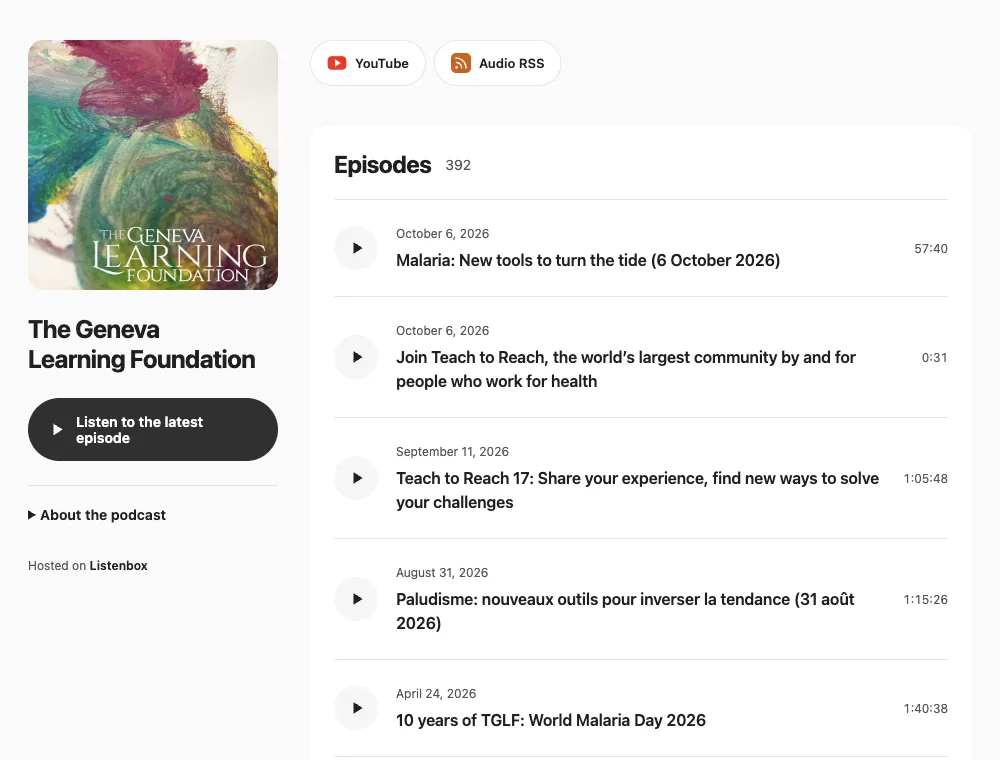
Show pages, episode pages, and browser playback
A recommendation can arrive anywhere. Give it a destination that works before someone has chosen a podcast app.
- Introduce the whole show
- Put your website in your bio or newsletter. Visitors see your artwork, learn what the podcast is about, and browse the catalog. The latest-episode button gives them a place to start.
- Share the episode that fits
- Every published episode has its own page. Send a guest their interview, recommend a particular conversation, or link straight to your newest release. Listeners can press play in their browser without a Listenbox account.
- Let listeners choose their app
- Add your Apple Podcasts and Spotify show links so visitors can open your listings. RSS links give listeners another way to follow in a compatible app, with audio and video feeds where available.
Your website updates
when you publish
Your show details and published episodes become your website. Change the artwork, update a description, or release an episode through your usual Listenbox workflow. We republish the website and RSS feeds in the background.
Keep making your podcast. There is no separate website editor to maintain and no episode archive to copy across.
Already on Listenbox? Find your websiteAbout your podcast website
Is a podcast website included with hosting?
Yes. Listenbox hosting includes a website for your show, with a home page, individual episode pages, browser playback, and listening links. Compare hosting options on the pricing page.
Can I use it for an existing podcast?
Yes. If you already publish with Listenbox, your website uses your existing show and published episodes. A show needs a published episode with available media before its website becomes available. Moving from another host? Import your podcast first, then check your new site before sharing it.
Does it work for audio and video podcasts?
Yes. Audio episodes play in a browser audio player. Video shows use a public YouTube video when available, or the episode's hosted video. Audio RSS and Video RSS links appear for the feeds your show has. Hosted video requires a video hosting plan.
Will my Apple Podcasts and Spotify buttons appear automatically?
Add your public show listing URLs in the dashboard to display those buttons. Listenbox does not look up or submit directory listings automatically. Listeners can also use your RSS links in compatible podcast apps.
What is my website address?
Your show slug becomes its Listenbox hostname: a slug of neberite gives you https://neberite.listenbox.app/. You can change the slug, but the old address is retired after publication and does not redirect. Update any links you have shared. Custom domains are not currently supported.
Follow the podcast website guide for setup, listening links, and changing your address.
Make your next episode easy to share
Host your podcast on Listenbox. Give listeners a website to come back to.